
Easyworld delivers services that people need to adapt and succeed in this changing landscape. We believe that people need software’s that plays vital role in helping their lives and business, and in enabling society to function. We specialize in serving people exclusively, with a focused commitment that puts customer satisfaction above all else.
Mobile application
If you think mobile apps are solely for big name brands, multi-national corporations and billion dollar companies you are wrong. More and more small and mid-size businesses are following the mobile trend; understanding that an effective mobile strategy involves more than just a mobile-friendly website.
In fact, these days you’ll notice that many of the small businesses that you interact with every day have their own dedicated mobile app — be it your corner coffee shop or the beauty spa downtown. These companies are ahead of the game when it comes to taking their marketing to the next level. One of the most important reasons that you should consider designing your own app is the fact that you can remain visible to your customers at all times.
Our experienced developers expertly build your mobile app solution that solves your business need(s), aligns with your vision and enhances customer satisfaction. So if you are looking for a mission partner to deliver a mobile app solution that solves your business need(s), you are at the right place and we are the perfect partner for you.
Website design
If you have a business and don’t have a website, you are losing out on great opportunities for your business. A website itself can be used to accomplish many different marketing strategies to help your business grow.
As a business owner, you need to know where your consumers are. But what if consumers know your business and what you can offer, but they can’t reach you? That is one of the risks you take by not having a website for your business.
Our developers build responsive website that are easy to navigate and uniquely fit to the screen of any device that is used to view it. We integrate compelling call to actions (CTA’s) on your website to enhance the conversion of visitors into paying customers.
Our core web design services ensures that your website has:
• Unique responsive views
• Scalable structure for SEO
• Enhanced social share ability
At Easyworld, we understand that your brand identity relies on the perceptions of your customers. That is why we build websites that projects your brand message and embrace the latest technologies.
Event streaming
Gone are the days when your friends and loved ones will miss your ceremonies because of distance, work and other factors. Your friends will watch your wedding live on their phones, tablet or laptops irrespective of their location on earth, giving them a great opportunity to participate in it also sending their blessings, love, wishes etc. Give us your wedding and let's make it a life time event that will be accessible for life.

5) Use your laptop’s built-in battery saving mode
Today, most laptop manufacturers include battery saving mode, low power mode, or a similar mode where power efficiency is maxed out.
In these modes, your laptop uses a minimum amount of battery life, shuts down non-essential processes, and dims the screen to ensure you’re stretching battery life as far as it can go.
Low battery mode isn’t always ideal. If you’re working in a bright environment, then low battery mode will make it impossible to see what you’re working on.
However, if you absolutely need to stretch your battery’s life just a little bit longer, then right-click on the battery icon in your system tray (the bottom right corner of your screen) and adjust your battery settings to “Eco” or “Battery Saver” mode.
4) Disable devices, components, and ports that you don’t use
Your laptop is probably filled with ports and component drivers that you’ll never use.
It may be constantly scanning for Bluetooth signals, for example, or waiting for an Ethernet connection through the LAN adapter.
Some laptop users will never use any of these adapters or ports, in which case you can safely disable the ports without affecting performance. To do that, go to:
Control Panel > Device Manager
In Device Manager, you’ll see individual components separated into different categories. Some suggested devices you can disable include:
-Graphics Card (in the Display Adapters category)
-Optical Drive (in the DVD/CD-ROM Drives category)
-Ethernet and Wi-Fi Adapters (in the Network Adapters category)
-Bluetooth and Bluetooth device drivers
-USB ports that you don’t use
Obviously, you shouldn’t disable your Ethernet port if you plan on connecting a wired internet connection to your laptop, and you shouldn’t disable the graphics card if you plan on using grahpics-intensive applications – like PC games.
3) Adjust screen settings
In most cases, the screen is your biggest source of power loss. Your laptop’s screen is constantly draining the battery when it’s on. When you’re watching 1080p video or playing a full HD PC game, that battery is drained at an alarming rate.
To maximize battery usage, adjust screen settings to reflect your usage patterns. Do you regularly step away from your laptop for a few minutes? If so, then set the screen to turn off after 3 minutes of inactivity.
On some laptops, there’s a “dim” and “off” setting for your display. You can dim your laptop after 30 seconds of inactivity and then completely turn off the screen after a few minutes of inactivity.
To adjust these settings, right-click on your desktop, click Personalize, then click ‘Screen Saver’. To further customize your display settings, click on ‘Display’ on the left-hand side of that menu.
2) Eliminate unnecessary startup processes
Some PC users never adjust which programs launch upon Startup. I don’t know why – changing your startup list of programs will boost loading times while also improving battery life and overall performance.
To change boot order on your Windows laptop, tap the Start button and type in msconfig. Then, click the ‘Startup’ tab and uncheck the boxes beside any unnecessary programs.
None of the programs listed here are absolutely essential to your computer’s startup process (you can’t easily disable those processes). You’re safe to disable whichever programs you want to disable from this list.
Uncheck the boxes beside programs you rarely use or programs you don’t need upon startup.
1) Maintain your laptop and your battery
Your laptop requires some important physical maintenance.
That maintenance includes:
-Clearing dust out of the laptop’s fans and ports using a canister of compressed air. Excessive dust buildup will create heat, and more heat requires more cooling power. When your fans have to work extra hard to maintain a cool temperature, it reduces battery life.
-Removing the laptop battery and cleaning the ports with a cotton swab or soft cloth
-Occasionally let the battery drain completely, then charge it to 100%.
Modern laptop batteries don’t require the same drainage/recharge cycle as lithium ion batteries from a few years ago, but it still helps to drain the battery to 0% from time to time.

- Your phone must be rooted (click here to learn how to root)
- Click here to download chamelephon
- Open the downloaded chamelephon
- Copy and paste the new imei or you can tweak this one
- Imei 1 is for sim 1 while imei 2 is sim 2 so select your desired sim slot
- Now select apply new imeis
- And restart your phone for changes to take effect.
Facebook: www.facebook.com/daezyworld
Twitter: www.twitter.com/daezyworld
BBM channel:C00IAI69E
Whatsapp: +234703006939
 Rooting of android phones can be time consuming & diffcult because of the procedures given by phone expertise. No matter how patient you are during the process, you may liberate your Android device from all the restrictions imposed on it by its manufacturer.

Facebook: www.facebook.com/daezyworld
Twitter: www.twitter.com/daezyworld
BBM channel:C00IAI69E
Whatsapp: +234703006939
Have you being going through tough time due to the result of fast battery drainage and a very slow charging process?
Worry less cause the hints below will not only reduce the rate at which your battery life diminishes but also it enhance a fast charge of your phone.
In other to charge your Android phone very fast there are two methods to use, the first is using ultra power saving mode which will disable background apps that consume background.
while the second method is using airplane/flight-mode on your phone. Using this method you don’t need to switch off your phone in other to charge it fast.
Ultra power saving mode:
This method charges your phone faster by disabling all your apps and allowing you to use phone basic app like phone calls, small, alarm etc. This will reduce the phone functionality thereby reducing battery consumption and increasing charging time and still allows you to use the phone for its basic functions. This is my favorite method of charging whenever am in a hurry.
Airplane/flight mode:
This method is faster than ultra power saving mode, whenever the phone is not in use its preferable because all network communications are cut off including WiFi and Bluetooth. but you can still use phone for other Functions like playing music, video, games etc.
Feel free to connect with your favorite method and have a thrilling experience.
Tell someone about your new discovery,
Don't be greedy.
Facebook: www.facebook.com/daezyworld
Twitter: www.twitter.com/daezyworld
BBM channel:C00IAI69E
Whatsapp: +2347030069397


Sincerly, the plan is partially unlimited, either you subscribe to daily, weekly or monthly, all of them capped to 6GB data, but you will still be able to use BBM and other social messengers when you exhausted your 6GB allocated data
Subscription Codes For Etisalat Bblite Plans
» For daily plan, dial *599*2*2#, cost N70
» For Weekly plan, dial *599*2*1#, cost N350
» For Monthly plan, dial *599*2#, cost N1000
Alternatively by sms;
Send the keyword to 399
For daily send DLITE
For weekly send WLITE
For monthly send MLItE
» You can use your installed Psiphon Handler, NetifyVpn, or download Sypon Shield
» Or Download Moded Tweakware
» Etisalat Bblite active plan
Create New APN settings On Your Phone As Follows:
» Open your phone settings > Go to more > Go to mobile network > Go to access point names > Select Etisalat, Then create new APN and configure as shown below:
» APN: blackberryx.net
Password and username leave it empty
Then Launch Sypon Shield or Psiphon Handler, in the handler menu:
Proxy type: Real Host
» Proxy server: blackberryid.blackberry.com
» Hit the Save button
» Go to your More Option settings and untick connect through HTTP Proxy
Then wait for few seconds for it to Connect.
Tweakware Mod Settings
» Switch to Logs then Click on Handler Menu
» Its will request for Tweakware childlock code then input: cdce.imishiro.032990
» After unlocking, use Real Host as proxy type and then clear the click.php in the proxy server and replace with blackberryid.blackberry.com
» Click on Save
» Go to SETTINGS and untick connect through Http Proxy
» Then go back to HOME and click on CONNECT
It may take few seconds to connect, but if it doesn't connect in time, just off and on the data connection again.
Start surfing and enjoy your unusual unlimited downloading/Streaming!
Put a smile on your friend's face by inviting them to Easyworld and giving them solutions to their phone and PC s, Via our social platform:
Facebook: www.facebook.com/daezyworld
Twitter: www.twitter.com/daezyworld
BBM channel:C00IAI69E
Whatsapp: +2347030069397
Airtel data plan: how to use the airtel #500 for 6gb data on 3g network
Thursday, June 16, 2016
Few days back, Airtel introduced the cheapest data plan ever in which you can get 2GB for just N200 and also 6GB for just N500, but the worst part of it is that the plan was banned for using 3G network which I was earlier described as trash data plan.
Permit me to pick my word from recycle bin and re-frame it with another better word, it seems this Airtel new plan can't be refer as trash data plan anymore, since we have got a means of flex with it on 3G network! A big kudos to whoever detect this proper method. Follow the instruction below carefully to get your Airtel 2G data rolling on 3G Network.
Needed Materials
• Your device must be rooted for this to work
• 3G/4G Speed Optimizer - Download it Here
• Script manager - Download it Here
• 3GTurbo Changer script - Download it Here
Steps to Follow
I believed you have downloaded the required materials.
• Now, start the 3G/4G Optimizer
• Select network speed as 12/28/7 (set to max)
• Tick down speed increase
• Tap on Apply Tweak!
• Reboot the device once you have saved the change
Next, is to open the Script Manager
» Locate the file which you downloaded, named -3GTurboChanger_Installer_Updated_3_test_11.sh.txt
» Allow the Super User when requesting for permission or click on the Super User Icon, grant the permission and run the script
» Scroll up and set the setting to fastest to get the maximum Data Speed, then.
» Reboot your device, and switch to WCDMA Mode (3G Network) on your phone setting
It seems this 2G data plan making sense now, at last, you can now flex with 3G speed on your 2G data plan. Enjoy it while it last.
Know airtel 2g

Hope you guys still remember the MTN StartPack? Which is a special tariff plan that allows New MTN customers enjoy 500% bonus on every recharge, e.g. you recharge N100, you get N600; N200 gives you N1,200, N500 gives you N3,000; N1,000 gives you N6,000. A full detail about it was already published on this blog few months ago, just click here to view it.
When running test on MTN StartPack, we noticed that after loading ₦100, you can use up to 1GB, and your money will still be intact and the amazing part is that it does not fall into the categories of MTN data plans zapping the internet data anyhow.
With the instruction below which is very simple, you can either get 10GB or 11.5GB worth of data (based on your choice) for just N1000, but I think you will love that 11.5GB. MTN StartPack is not something new to us, but many of us are unconcerned about how much "Yafun Yafun Bonus" you can actually get from it. Let's go straight to the main business.
What Do I Need?
>>A new Sim,
>>Get it registered and activated.
Steps involved For 11.5GB For Just N1,000
1. No need to migrate to any package, just leave it on the package it came with.
2. Recharge N100 and you’ll be given N500 to call and browse
3. Don’t use it for calling, Just use it for browsing
4. N500 bonus will give you 1GB data
5. 1000 recharge will give you 10GB data
6. You can then use your untouched N1,000 in your normal account to subscribe for 1.5GB data plan after exhausting your 10GB making it 11.5GB.
7. To check your data balance, dial *556# or *559#
Now tell me, which other plan can be better than this? #JustCommonSense!
Note that you don’t need to load the N1,000 at a time. You will use 1GB on each of the N100 Airtime you recharged. N100 x 10 = N1,000 and 1GB x 10 = 10GB! To check your data balance, dial *556# or *559#
The accumulated N1,000 balance will still be there untouched. Use it to subscribe to an MTN data plan of 1.5GB for 1k (dial *123# to subscribe) making a total of 11.5GB for just 1k all together. When you exhausted your 11.5GB, follow the initial steps to get another one.
As simple as that! That is how you’ll be doing it for the next 6months. After 6 month, your StartPack 500% Yafun Yafun Bonus will expire, you will have to get another new sim and repeat the steps above.
Your 11.5GB works for all devices ranging from Android, iPhone/iPad, Laptops, Modems, Blackberry, BB10, Windows phone, Symbian/Java phones; you just name it. If you wish to enjoy this Yafun Yafun Bonus, consider getting yourself a new MTN sim, register and activate it and you are automatically on the MTN StartPack tariff plan. Let’s hope MTN still keep this tariff plan for us.

Airtel Nigeria has a wider range of data network in Nigeria, and with this advantage, we will look at how to get Airtel 2.5gb for #1000. without any VPN imei tweaking, It works on all phones and PCs without data zapping.
Last week we learnt how to get 4.5gb for #1000
To Activate Airtel 2.5gb for just N1,000.
» Get a new Airtel sim card or older one, insert it into an MTK Android Device.
» Make sure the SIM is registered.
» Recharge N1,000 Airtime on your Airtel sim card using this USSD code *555*Card Pin#.
» You will be credited with 1GB worth of Internet data and N1,000 bonus airtime for Airtel to Airtel calls only. You can check your data balance and bonus by dialing this USSD code *556#.
» Now dial this ussd code *496# to subscribe to the Airtel 1.5gb plan for N1000,
Now, you have a total of 2.5gb worth of data plus 1k free airtime with just N1000 it works on all phones and PCs without changing your IMEI,
This method was tried on new Airtel sim as at the time of writing this piece.
Load airtime of #1000 by using *555*amount#
Put a smile on your friends face by inviting them to Easyworld and giving them solution to their phones and PC problems. join our social platform:
Facebook: www.facebook.com/daezyworld
Twitter: www.twitter.com/daezyworld
BBM channel:C00IAI69E
Whatsapp: +2347030069397

1. It offers 500MB for a token of N100.
2. The data works without tunneling/vpn apps.
3. Can be utilized both day and night.
4. It can be used on both Smartphones and PC's.
5. It can be tethered via WiFi, Bluetooth or USB cable.
6. It is valid for 168 hours.
7. Works on selected MTN lucky SIMs (Not all sim supported)
To Activate MTN 500MB For N100
1. Load your MTN sim with N100. Dial *446*11*4*7*5# to subscribe.
3. You’ll get a confirmation message upon successful subscription and 500MB will be given to you.
4. To check your MTN Quick WinD data balance, dial *559# or *559*2#
When trying to activate, if you receive a message like "Yello your subscription to mtn quick winD has failed", It means that your sim is not supported and you need to get another MTN sim, if you want to benefit from the offer.
Put it smile on your friend face but inviting them to Easyworld and giving them solution to their phone and PC s join our social platform:
Facebook: www.facebook.com/daezyworld
Twitter: www.twitter.com/daezyworld
BBM channel:C00IAI69E
Whatsapp: +2347030069397

MTN GAMEPLUS data plan is a free 150MB game data plan been given to MTN users that wish to subscribe to it. This free Game plan is valid for a period of 7days. However, you can opt out and opt in at any time. Moreover, you can be on MTN music plus and still subscribe to the MTN Game+ plan.
Why this is tweak is very interesting is because it can be used with tunneling servers like Simple server, Psiphon, OpenVpn etc or used alone. With these settings, you are guaranteed unlimited free downloads on MTN gameplus package.
How To Subscribe to MTN Gameplus Data
Go to Your Message
Type GM to 2200
U will be given free 150mb
Check your data balance with *559#
How To Renew 150MB MTN GAMEPLUS Data.
After exhausting the 150mb, send STOPGM to 2200 as SMS and you will receive a deactivation message, re-send GM to 2200 to receive a welcome back message with a fresh 150MB. Just keep doing this and keep flexing until they block it again.
Manually activating and deactivation of the 150mb MTN gameplus data could really be stressful and unsuitable especially when you are streaming online and you don’t want to experience a disconnection. That is where SMS Scheduler comes in.
Follow this steps to use sms scheduler
Download SMS Scheduler app from HERE
Launch the app
Input 2200 in the phone number box
Input STOPGM in the message box
Confirm the date and time
Go to Frequency and select the time interval it will take you to use up the 150mb (for us its about 25 minutes) and save
Return to the app interface and create another entry
Input 2200 in the phone number box
Input GM in the message box
Confirm the date and time and set your SMS interval same as the first
Saved and Exit
How to configure your vpn.
How To Use MTN Free 150MB Game Plus on Android
You can tunnel this data plan to power every other application on your android device. With the help of ProNet v10.10 or ProxyDrpoid, tunnelling the package would be possible.
Open Psiphon
Tick Remove Port box
Proxy type: Dual Real Host
Custom Header: host:game.mtnonline.com
Proxy Server: game.mtnonline.com
Real Proxy Type: Inject
Then Save.
Now select United States as region or use any other region.
Go to More options and configure using the settings
below
Tick connect through an HTTP Proxy.
Also Tick Using following settings…
Host Address: 10.199.212.2
Port: 8080
How to Use the Gameplus plan On PC
After getting your Android phone configured as described above, simply use it via USB tether or wireless hotspot to connect to your PC any time, anywhere and any place.
To do this, you either use the DF Tethering Fix method, Pdanet +: Share VPN Network from Mobile to All Devices.
Now over to you. How is your experience with MTN Nigeria? Drop your comment!!
Cheers.
Put a smile on your friends' face by inviting them to Easyworld and giving them solution to their phone and PC problems join our social platform:
Facebook: www.facebook.com/daezyworld
Twitter: www.twitter.com/daezyworld
BBM channel:C00IAI69E
Whatsapp: +2347030069397 to join Easyworld whatsapp group send a message to us in other to add you.
For the past 2 months, telecommunication industries in Nigeria has seen lot's of positive changes which has resulted to serious competition in the market. All of them are introducing different data plans, so today we are going to look at MTN Nigeria's new data plans.
The following plans have been tested, and they work perfectly on Android, iPhone and Laptops. Please note that this article has been updated to reflect the new data changes that occurred in May 2016, so you can be sure that the info here is 99.9% correct and recent.
Daily plan
50MB for Just N50
Text J12 to 142 to subscribe for 50MB for just N50 and you can check your data balance by dialing *559*60#. This bundle is valid for a day.
100MB for Just N100
Simply text J11 to 142 and you will receive a message like this: "Dear Customer, you have received 12Mins for National calls & 100MB. Bundle is valid for 7days. Dial *559*60# to view your bundle balance."
Note that the offer is limited to only subscribers who are on MTN beta talk and if you really want to enjoy this offer then I guess you need to migrate to MTN Beta Talk now, simply dial *123*2*6# to migrate to beta talk tariff plan.
500mb for #25
This is the cheapest data plan you get 500mb for just #25 and it lasts for only 4 hours from 12:00am to 04:00am. You can only activate it once in a night on one sim. To activate send “nights” to 131, please be informed that You will have to be on the Pulse plan to enjoy this. To migrate to MTN pukse, Dial *406*1# to Migrate to MTN iPulse.
Weekly Plans
750mb for #500
This plan lasts for 1 week only it is designed for every MTN customers irrespective of your tariff plan. you get 750mb for #500. To activate send “103” to 131, to check your bundle balance send “2” to 131.
1gb for #500
This plan is also available to Ipulse users only and the bundle last for only 7days so to activate Dial *406*2#, then Select 1. To check your data bundle balance On this plan; Dial *131*4#.
Monthly plan
1.5GB for #1000
This is the cheap monthly data plan from MTN Nigeria so far. To activate, dial *106# or text 106 to 131. Valid for 30 days.
3.5GB for #2,000
This is good for downloaders, those that love watching movies online, and to play online games this plan is recommended for you. To activate dial *110# or text 110 to 131. Valid for 30days.
10GB for #5,000
This is a new plan launched in May for 2016. I will recommend this one to super heavy downloaders and for those who need it for office work. To activate dial *116# to subscribe. 30days validity
22GB for #10,000
This is a new plan also launched in May 2016, and I will recommend this for use at work, home Wi-Fi etc. To activate dial *117# to subscribe. 30days validity.
That’s all about MTN Data Plan. Please if you notice that any of this code is not working, let us know so that we can update it with the new one.
Now over to you. How is your experience with MTN Nigeria? Drop your comment!!
Cheers.
Put a smile on your friends' face by inviting them to Easyworld and giving them solution to their phone and PC problems join our social platform:
Facebook: www.facebook.com/daezyworld
Twitter: www.twitter.com/daezyworld
BBM channel:C00IAI69E
Whatsapp: +2347030069397 to join Easyworld whatsapp group send a message to us in other to add you.


I think this should be the best offer to enjoy, but we understand that Glo GPRS network are very poor in many parts of this country, but I just want to you to be happy with this news, because this is how Globacom normally take the lead while others we surely follow, just have a strong believe that your favorite network are coming very soon with this new favorable data plans. Competition always brought out the best.
If the Glo network is good in your area, then you can check out this mind blowing data offers.
New Glo Data Plans, Price, Data Size And Validity Period
1. 2GB for N1,000 valid for 30days
2. 6GB for N2,000 valid for 30days
3. 10GB for N2,500 valid for 30days
4. 12GB for N3,000 valid for 30days
5. 18GB for N4,000 valid for 30days
6. 24GB for N5,000 valid for 30days
7. 48GB for N8,000 valid for 30days
8. 60GB for N15,000 valid for 30days
9. 90GB for N18,000 valid for 30days
To Subscribe
» Load the required amount of money on your Glo Sim.
» Dial *777#, then choose Data Services » Buy Data » Monthly Plans.
» Follow the on-screen instructions as it is very simple.
Glo has joined the zapping data team with their Glo BIS on Android device, I just hope data zapping won't be experienced while using this new data plans.
What do you think about this newly rolled out Glo Data bundles?
Put it smile on your friend face but inviting them to Easyworld and giving them solution to their phone and PC s join our social platform:
Facebook: www.facebook.com/daezyworld
Twitter: www.twitter.com/daezyworld
BBM channel:C00IAI69E
Whatsapp: +2347030069397

With the great revolution going on in the Nigeria telecommunications industry because of the high demand for data by Nigerians, all the service providers are now waking up from their sleep by reducing the cost of subscription and increasing the volume of data. today am going to show us how to get Airtel 4gb for just #1000.
To Activate Airtel 4GB For Just N1,000
» Get a new Airtel sim card or older one, insert it into an MTK Android Device.
» Make sure the SIM is registered.
» Recharge N1,000 Airtime on your Airtel sim card using this USSD code *555*Card Pin#.
» You will be credited with 1GB worth of Internet data and N1,000 bonus airtime for Airtel to Airtel calls only. You can check your data balance and bonus by dialing this USSD code *556#.
» Now dial this ussd code *431# to subscribe to the Airtel 3gb plan for N1000, remember it is the BIS plan that works on Android devices via IMEI tweaking.
» You will be given 3GB data in some devices and at times, you might see an error message.
» Just ignore the message, your N1000 will be deducted and you will then be credited with the 3gb worth of Internet data. Check your new data balance, by dial *140#.
Now, you have a total of 4GB worth of data plus 1k free airtime with just N1000 Even if you don't change your IMEI, the first 1GB data given to you will work on your device, but if you want to use the 3GB data that you subscribed for, you will have to tweak your IMEI to that of a BB10 device IMEI.
Airtel Nigerian have wider range of data network in Nigeria, and with this advantage we are going to look at how we are going to get Airtel 4gb for #1000. This method was tried on new Airtel sim as at the time of writing this tutorial.
Load airtime of #1000 by using *555*amount#
You will be given 1gb of data as bonus, #1000 of free airtime for calls & #1000 for airtel to airtel calls
Subscribe to airtel bis by dialing *431#
Change your phone imei to this one
After tweaking you can start browsing and flexing your 4gb of data on the go.
Put it smile on your friend face but inviting them to Easyworld and giving them solution to their phone and PC s join our social platform:
Facebook: www.facebook.com/daezyworld
Twitter: www.twitter.com/daezyworld
BBM channel:C00IAI69E
Whatsapp: +2347030069397

1. Use WhatsApp without your Mobile Number
- If you are already using WhatsApp, uninstall it from your device completely. Download and install it again.
- Lock your messaging service simply by changing the flight mode.
- Now open WhatsApp and add your number to it. So it will not be able to send the message to the server it will ask you to choose an alternative method to verify.
- Choose the verify through message option and fill up your email address and then Click on ‘Send’ option and without waiting click on ‘Cancel’. This terminates the authorization process.
- Now, you are required to forge messages. Install the message Spoof text message for Andriod and Fake- a- Message for iPhone.
- Spoofing method: Go to your Outbox -> Copy the message details to spoofer app -> Send it to spoofed verification.
- Use the following details.To: +447900347295From: +[Country code][mobile number]Message: Your email address
- A message will be sent through that spoofed number. You can use this number to connect with your friends
2. Hide “Last Seen” Timestamp

- Download the latest version of WhatsApp from the official website to enjoy this feature.
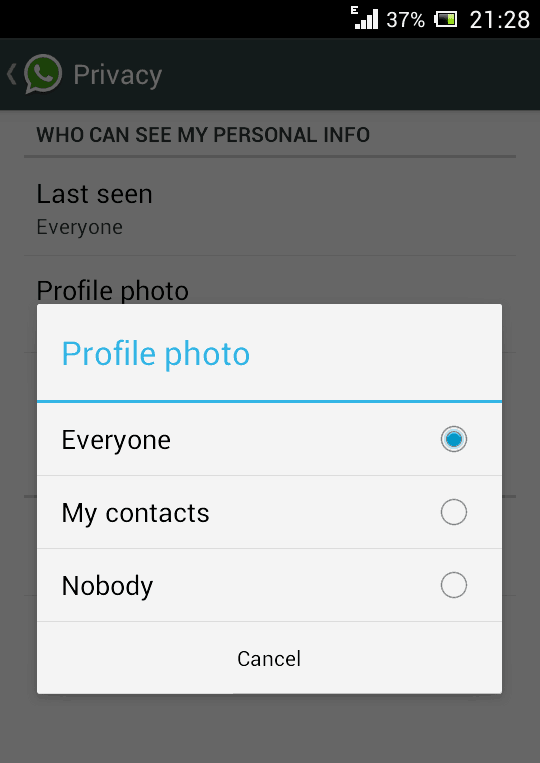
- To hide last seen feature, Open WhatsApp, Go to Settings > Account > Privacy > Last Seen.
- There you can select three options, Everyone, My contacts, Nobody. Select any one of them.
3. Spy and Read the Conversation of Your Friend

- Firstly, you need to do is, go to the MicroSD card and then click on the Whatsapp and later on on the Database option.
- Immediately after you are done with the first step you’ll get two files such as,msgstore-yyyy..dd..db.cryptmsgstore.db.crypt
- After finding these two files, you just need to do is take these files from your friends mobile and then you will be easily able to read their conversations that they have done with their friends. You can open them using a simple text editor.
4. Backup And Restore WhatsApp Chats

- On iOS, Go to Settings > Chat Settings > Chat Backup, then click Backup Now.
- On Android, just go into Settings > Chat settings and tap Backup conversations to create a backup.
- It will not backup your media, so you will need to use a file manager to backup the media files in /sdcard/WhatsApp/Media on your mobile.
- There’s no way to restore chats directly from WhatsApp, so if you want to restore a backup just uninstall and reinstall WhatsApp.
- While you begin WhatsApp just after the reinstalling your app, you should be prompted to restore your most recent backup.
5. Send files of other Extensions like Zip, Rar, PDF
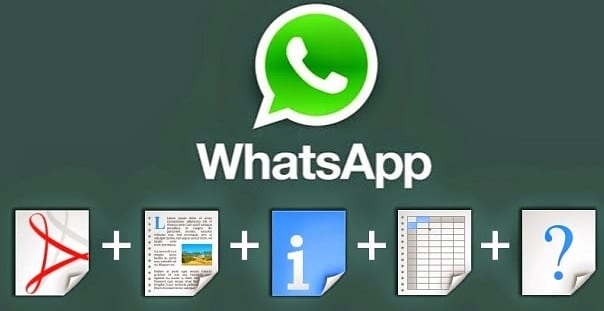
- We all know that WhatsApp doesn’t support to send other files than audio and video formats. There is not any option to share documents, compressed files, and other files using WhatsApp. But with an additional app like Cloud Send you can send PDFs, APKs, Word documents and more using WhatsApp.
- You can also use third party app like Whats Packed 2 ads to send any files of any size via WhatsApp. But make sure that both the sender and receiver must have Whats Packed 2 ads application installed on their smartphone.
- You can also use third party app like Whats Packed 2 ads to send any files of any size via WhatsApp. But make sure that both the sender and receiver must have Whats Packed 2 ads application installed on their smartphone.
6. Disable WhatsApp Auto Image Download

7. Hide your WhatsApp Profile Picture(DP)
8. Change Your Friend’s Profile Picture

- Choose a profile picture for your friend. Use Google Image search for cute looking monkeys and donkeys or weird looking people.
- Resize the image to 561×561 pixels using Paint or Photoshop and name it with your friend’s mobile phone number.
- Save the image to the SD >> card WhatsApp >> Profile Pictures. Overwrite the existing file (if necessary).
- Disable WiFi and data network. If you don’t WhatsApp will automatically update the picture.
- Now, you show your friend the pic your profile WhatsApp instant panic invite her face.
9. Create A Fake / Chat Conversation
Download WhatSaid App Here

10. Hide Two Images In One
- Download & Install Magiapp for android and and FhumbApp on iPhone.

- Now after installing this wonderful app just fire it up and then you will see interface something lie in the image on the right.
- Now just click on the True Image option and choose your original image and then click on the Fake Image option and choose your pranky image.
- Now after selecting your images just press Do Magic ! option and voila! its done now just share your image with everyone.


